Search This Blog

Aug 4, 2019

Others tools and activities for Cooperative learning and ICT PART 2

Use of Blogger to apply CL

Well for us this project was the perfect way to test the cooperative learning with ICT in ourselves, because we divide every job per each member of the group assigning the person more capable to do each job and the result is on your sight, but what else we can do with blogger or other blog platforms like Wordpress or Tumblr? well, the answer is that you can assign different types of jobs, but in this case, a great way to use cooperative learning is do a Dossier of a book or a graphic novel that they will have to choose in a selection provided by the teacher or in case that you want to give them more creative freedom you can let them choose one out of the list, but with a previous check to be sure that their selected work is appropriate for their age and level.

E.g

A Dossier in Blogger of Children's and juvenile literature, plus Seconds by Bryan Lee O'Malley


Use of Codeshare

Codeshare is one of the most famous tools to teach programming, and with great support provided by Stanford University, IBM, Microsoft, etc. this platform can be used in advanced students that get caught by scratch in their early student life and want a more challenging task. In this case, the most difficult thing is getting two requirements to teach this platform and the first one is acquire knowledge in a certain programming language like java, CSS or c+(our recommendation is learned HTML and CSS to develop webpages), and the second one is time because these projects require time and can even be stressful for some students at the deadline.

an example of using comments in programming(lines that start with # are comments of what the code suppose to do)
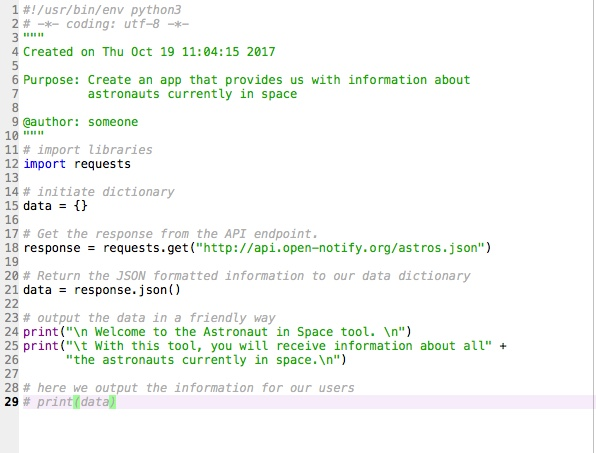
Image result for comment in coding


BACK   NEXT

The Jigsaw Method

The jigsaw method is an effective way to increase student engagement through group work that facilitates peer-to-peer learning.


Why Is It Important?

Introduced by Aronson (1978), Jigsaw is an efficient way for students to become engaged in their learning, learn a lot of material quickly, share information with other groups, minimize listening time, and be individually accountable for their learning. Since each group needs its members to do well in order for the whole group to do well, Jigsaw maximizes interaction and establishes an atmosphere of cooperation and respect for other students. Teachers who listen in to the sharing of one of the jigsaw groups can quickly hear what each of the original groups has been doing.

Aronson compared classes that used the cooperative jigsaw approach with classes in which students worked in competitive groups. He found that children in the jigsaw classrooms outperformed children in competitive classrooms in terms of mastery of classroom material. Black and Hispanic children performed significantly better in jigsaw classrooms than in competitive classrooms.

There are many benefits of using jigsaws in the classroom including the following:

  • Improves team and class dynamics by helping to build trust, creating a space for candor and for respectful disagreement, and making a safe space for taking emotional risks.
  • Helps build cohorts (i.e., within majors) by enabling students to really get to know each other in one class, which can translate to more interactions outside of class in departmental and campus activities.
  • Fosters student engagement through peer learning and more equal participation by everyone in the group by empowering individual students to share their own “expertise” or contribution to the jigsawed group.
  • Requires students who are shy or quiet to participate more fully in active ways.
  • Efficiency (time-saving): possible to cover more material rapidly when students are assigned different readings/roles/etc. and then teach each other in the jigsaw.

Cooperative learning - Jigsaw - ICT

One example of a cooperative learning approach utilized in a face-to-face setting that can also quite effective in an online class is the Jigsaw method. In the jigsaw approach, instructors create learning groups knows as ¨home teams¨. Each individual on the team is assigned a particular focus in terms of research or portion of an assignment. These individuals become experts in their particular area. Each home team will have an expert in the corresponding area. The experts from each of the teams will meet. This will provide them with an opportunity to engage in research, discussion, and also work to synthesize material so that they come back and share this with their ¨home team¨. Online, the use of chat rooms or live breakout sessions is an excellent way to accomplish this. In addition, as the instructor, you can assign particular roles to most effectively meet the needs of the students in your class. This is a wonderful opportunity to built upon students strengths and areas of interest.

BACK    NEXT

Cooperative learning VS Coolaborative learning

Cooperative vs Coolaborative: What is the difference? 

 Although these methodologies share a goal in common, to give learners opportunities to engage with their pairs in thoughtful learning, they are not the same. It is really important that we understand the differences in order to use them effectively in the classroom.


BACK      NEXT

Others tools and activities for Cooperative learning and ICT

According to the previous post, we understand that Scratch is a multi-purpose tool that can help us with a wide range of activities also we will find a fantastic community that could help us to shut down problems and is constantly building new solutions for new types of classes for subjects from Music to Physics, but what happen if I don't like Scratch and I want to use other ICT solution to apply Cooperative learning(CL) like H5P, Blogger, Pinterest or any other platform. Well, to be clear the only one that can stop you to use those tools for that purpose is yourself. Because to apply CL, you have to apply what you learn in the post "How to implement cooperative learning...", with a new ICT tool as we are going to show in the next lines on this post(the following examples are going to skip the formation of groups):

Use of H5P to apply CL

In the case of H5P, we will found a wide spectrum of solutions to teach a second language in a dynamic way that can be found more interesting by grown-ups students, because It has a more complex interface and It looks less childish than Scratch, but It's really simple to use once for a level B1 student or even an A2 student that requires scaffolding. Anyway, for this first example, the task for the student is to create a 'Drag and drop'(DAP) activity in which the teacher will provide them a theme and an example of how to do it plus example material, then the students in groups of 3 or 4 will have to develop their own DAP in wich one of the most important points is use created material in Paint or any other tool to create images. So the steps that the students will need to create their DAP after the explanation are:

1. Define who is going to create graphic content and who is going to create the DAP

2. Brain Storming to define what they are going to do.

Content Creators:

2.a.1 Define the tool for graphic content creation

2.a.2 Create the content 1 background image and text elements or images that are going to be part of the DAP

2.a.3 Ask if the content is accurate
        - If not they have to fix
        - if is they have to deliver the content to his partner

H5P Developers:

2.b.1 Create an H5P account in https://h5p.org

2.b.2 In the account page go to "try out H5P" or go direct to https://h5p.org/node/add/h5p-content, and search "Drag and Drop".

2.b.3 Students create the title and add the feedback and wait for the images


2.b.4 Upload the background image

2.b.5 Define the task and use the elements provided by their partners

2.b.6 Add drop zones

2.b.7 Add text or images that correspond to the drop zone


2.b.8 Save

3 Copy and paste the link of the job and send to the teacher email

E.g.


BACK      NEXT

How to implement cooperative learning in our classrooms?

In the first place, to implement cooperative learning in the classroom, we have to unite the group and make a good classroom environment. In order to achieve that, it's necessary to plan different activities for the students to know each other and interact, encouraging participation within the group. Then, the students have to make workgroups in which they will have to distribute roles, set the rules within the group and apply cooperative structures through simple and complex collaborative dynamics.

A fundamental part of this kind of methodology is the formation of groups, of course. They are not formed randomly. Teachers have to make up groups as diverse as possible with reference to performance, gender, ethnic group, etc. In order to get a better organization, a positive interaction, and equitable participation it is recommendable to assign roles. In this way, we can avoid some potential conflicts inside the classroom. For instance, it decreases the probability of "x" student takes on a passive or a dominant attitude. In addition, it creates interdependence among members of the group. Each role has a different function, the most common ones are:


  • Spokesperson
  • Secretary
  • Moderator
  • Agent of order 

Finally, cooperation has to be evaluated through different types of evaluation such as group and individual evaluation, peer-assessment in which they evaluate their partners' performance or self-evaluation where the students can evaluate themselves, their own work and learning progress.


BACK     NEXT

Aug 3, 2019

Introduction to Cooperative learning and the importance of ICTs

Cooperative learning

Cooperative learning refers to a model of teaching created to counteract the individual and competitive models proposing as its name indicates the teamwork among students in order to achieve common goals and maximize individual and collective learning.

      What is it for?

Its main purpose is related to the development of different competences and skills through work dynamics in groups and social interaction with well defined roles. The idea is to promote essential values such as collaboration, empathy, participation, responsibility and autonomy. Furthermore, this methodology contributes to the development of social abilities and inclusion.

Principles of the cooperative learning
  • Group formation: Students make “you” into “us”.


  • Positive interdependence: Everyone is worried about the learning of the group.


  • “Face to face” interaction: Working together means learning together.


  • Individual responsibility: Shared responsibility.


  • Social skills: Students learn to live together.

Reference

1.- Saravanan, T. & Dr. Nagadeepa, N. (2017). Applied Cooperative Learning Environment. Retrieve from https://pdfs.semanticscholar.org/ce52/219603cea552197b9cc2a9633ba3d730e110.pdf

2.- Tomlinson, C. A. (1999). The differentiated classroom: Responding to the needs of all learners. Alexandria, Va: Association for Supervision and Curriculum Development.

3.- Meier D. & Knoester M. & D'Andrea K. C. (2015). Teaching in Themes: An Approach to Schoolwide Learning, Creating Community, and Differentiating Instruction. Teachers College Press

4.- Costa, S. Gomes, A. & Pessoa, T. (2016). Using Scratch to Teach and Learn English as a Foreign Language in Elementary School. Retrieve from https://www.iaras.org/iaras/filedownloads/ijels/2016/002-0027.pdf


BACK      NEXT


Others tools and activities for Cooperative learning and ICT PART 2

Use of Blogger to apply CL Well for us this project was the perfect way to test the cooperative learning with ICT in ourselves, because ...